Buying makeup is mostly an act of faith. The lipstick in the tube, the eyeshadow in the pan, the look you saved from a tutorial: none of them tell you how they will actually land on your face until the moment you have already committed. A virtual makeup try-on removes that leap of faith. You see the look on yourself first, then decide.
Here is what a virtual try-on really is, how the AI version differs from a filter, and how to use it to test any look for free.
What a virtual makeup try-on actually does
A virtual makeup try-on shows a makeup look on your own photo instead of a model's. The old versions were filters: a fixed overlay of one preset, snapped onto a face-tracking mesh, often sliding out of place the moment you turned your head. Useful for a quick laugh, not for a real decision.
AI changed the ceiling. An AI makeup generator does not pick from a preset list. You hand it any look you like, from a magazine, a saved post, or a friend, and it transfers that technique onto your face while keeping your identity untouched: same face shape, same eyes, same brows, same skin tone. The result is not a gimmick. It is a photorealistic preview of you wearing the look.
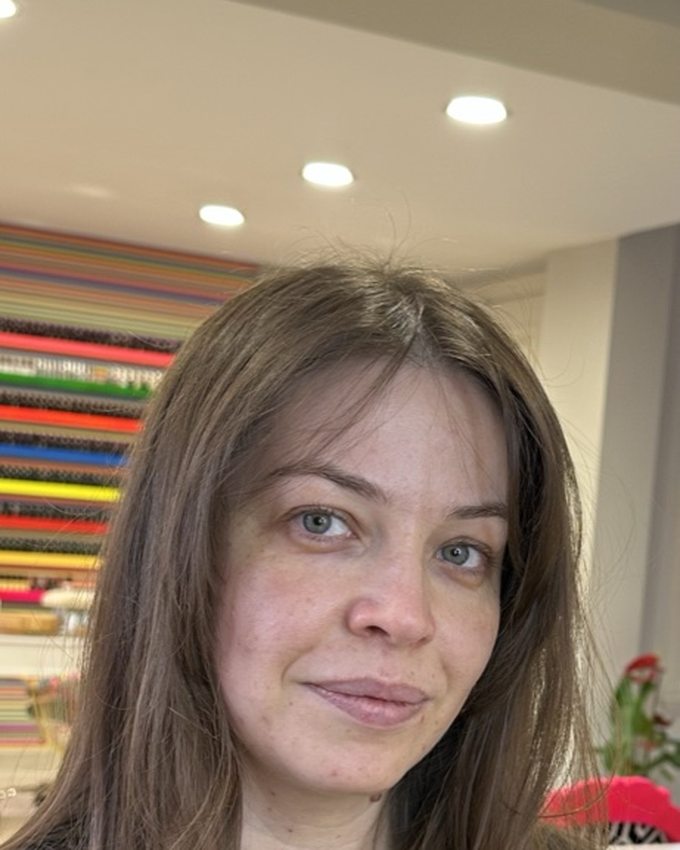
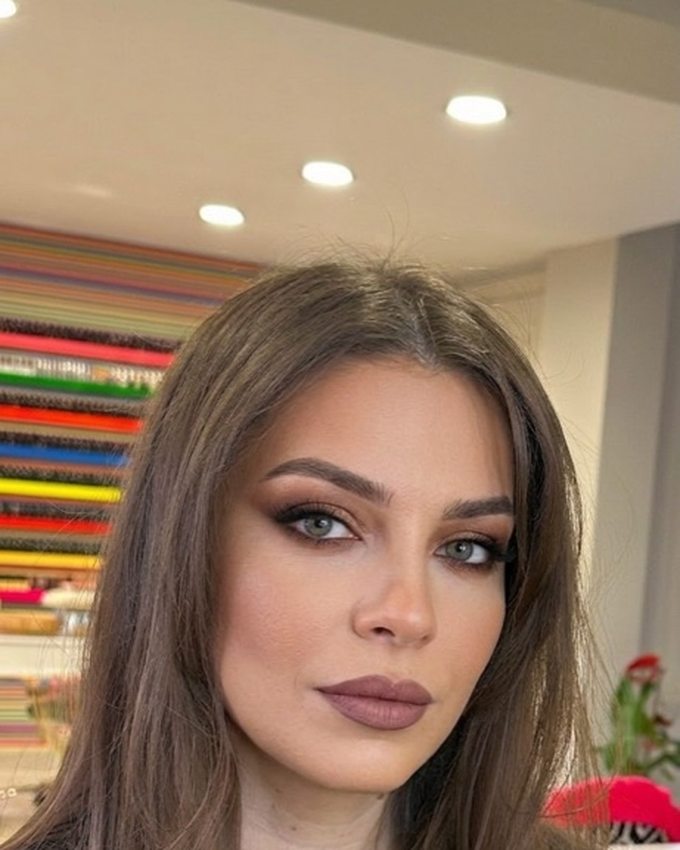
Why AI try-on beats a store swatch or a filter
- It uses your face, not a model's. A shade that glows on the promo image can read completely differently on your complexion. The try-on settles that instantly.
- It keeps your features. Unlike a filter that smooths and warps, the AI preserves your face shape and skin tone, so the preview is honest.
- It is not limited to presets. Any look you can find a photo of, you can wear. That includes bold looks no filter would ever ship.
- It is faster than a store counter. No wipes, no testers, no trekking to a shop. You test ten looks from the couch.
How to try on makeup virtually, step by step
- Take one good selfie. Daylight, face forward, hair off your face, no makeup needed. This is your base for every look.
- Collect the looks you want to test. Screenshots, saved posts, a product's promo image. Include a natural one, a bold one, and one you would never normally try.
- Run each look on your selfie in AI Makeup. Each try-on takes seconds. Save every result.
- Compare side by side. Use the before/after slider and trust your first reaction over the product description.
- Refine the winner. Swap the lipstick shade, dial the eyes up or down, change the skin finish. Small edits often turn "almost" into "exactly right."
Is it really free, and is it private?
Yes to both. AI Makeup is free to download on iOS and Android and includes free try-ons, enough to run the whole workflow above. There is no account to create, and your photos are processed privately: never stored on a server, with results living only on your phone. If you get hooked on testing every look you see, AI Makeup Pro unlocks unlimited generations.
Try any makeup look on your own face, free.
Take a selfie, pick a look, and watch it appear on you in seconds.
Try AI Makeup freeFrequently asked questions
Can I try on makeup online for free?
Yes. The AI Makeup app is free to download on iOS and Android and includes free virtual try-ons. Upload a selfie and any makeup look, and see it on your own face in seconds, with no account required.
How does a virtual makeup try-on work?
You give the AI two photos: your selfie and a reference of the makeup look you want. It transfers the technique from the reference onto your face while keeping your identity, so you see a photorealistic preview of yourself wearing the look.
Is AI virtual makeup better than a face filter?
A filter overlays a fixed effect and often warps your features. AI makeup try-on renders a realistic result that preserves your face shape, eyes, brows, and skin tone, and it can copy any look from a photo rather than a preset list.
Does virtual makeup try-on work for every skin tone?
Yes. The AI keeps your skin tone untouched and adapts the makeup to it, so you see how each shade reads on your complexion specifically, which is exactly where store swatches and generic tutorials fall short.